
R36S Review (2026): The Ultimate $40 Retro Handheld?
I’ve been playing retro games on my R36S for the past few months, and I’m genuinely surprised this thing costs less than a decent pizza. The portable emulation console market exploded over the last year, but the R36S handheld game console keeps its crown as the budget king.
Disclaimer:
This post contains affiliate links. If you use these links to buy something, we may earn a commission at no extra cost to you.
Here’s the real question: with newer competitors flooding AliExpress and Amazon, is the R36S still worth your money in 2026, or should you spend a bit more for something better?

After testing everything from Pokemon rom hacks to 1080p movies (yes, really), I’ll break down what this open source retro gaming console actually delivers versus what the marketing promises.
What Makes the R36S Special in 2026?
The Budget King with Real Performance
Let’s get pricing out of the way first. The R36S typically runs $35-45 depending on where you buy it, which puts it in a weird sweet spot. The Miyoo Mini Plus sits at $60+, and the Anbernic RG35XX hovers around $50-55. That $15-20 gap matters when you’re testing the waters on retro handhelds or buying something for a kid who might lose it at school.
The RK3326 quad-core processor inside isn’t cutting-edge, it’s the same chipset from 2019 budget devices. But here’s the thing: it doesn’t need to be. For 8-bit, 16-bit, and PS1 games, this processor still crushes it. You’re not buying this for PSP or GameCube emulation (spoiler: those don’t work well). You’re buying it for the nostalgia games that actually matter.
I use mine on the bus, during lunch breaks, and on flights where I don’t want to risk my expensive Steam Deck. It’s genuinely pocketable, boots in seconds, and I’m halfway through Pokemon Unbound without a single crash.
Design & Build Quality: Surprisingly Good for $40
The transparent purple shell on my unit looks better in person than in photos. You’ve got clear plastic shell options in black and white too, though the purple gives off strong Game Boy Color vibes. The dual joystick layout makes platformers and racing games way more comfortable than d-pad-only designs.

Button quality gets mixed reviews online, but mine feels solid after 50+ hours. The d-pad is clicky and responsive, no mushy presses or false diagonals I’ve seen people complain about.
For the fighting game fans: I ran the ‘Hadouken’ test. The D-pad is decent, but hitting diagonals (down-forward) can be a bit stiff. It’s perfect for RPGs and Platformers, but if you’re trying to go pro in Marvel vs Capcom 2, you might find the pivot a little too rigid for high-level play.
Face buttons were slightly stiff out of the box but loosened up after the first week. The shoulder triggers feel cheaper than the rest, and I’ve read they’re the first thing to break with rough handling. Just don’t rage-press them during Mario Kart.

If you find the L1/R1 buttons rattle too much when you’re walking around, there’s a 2-minute ‘hack.’ I opened mine up and put a tiny piece of electrical tape on the inside of the button hinge. It stopped the rattling completely and made the device feel twice as expensive. It’s a common DIY fix in the R36S community.
Build materials are honest about what you’re paying for. This isn’t premium aluminum or rubberized grips. It’s basic ABS plastic that feels… fine. Not brittle, not flexing, just acceptable. For forty bucks, I wasn’t expecting Anbernic’s build quality, and I didn’t get it. What I got was something that survives daily backpack tosses without cracking.
The 3500mAh removable battery is a huge plus. When it eventually dies in 2-3 years, you can swap it instead of chucking the whole device. Real-world battery life hits 4-5 hours with moderate brightness and WiFi off. Not the “8 hours” some sellers claim, but enough for most gaming sessions. Fast charging is tempting but avoid USB-C to USB-C cables, stick with USB-A to C or risk frying the charging circuit.
R36S vs R36 Ultra vs R36 Max: What’s the Difference?
When searching for this handheld, you’ll likely see listings for the R36 Ultra or R36 Max. It is important to know that these are usually just marketing names used by different resellers for the same internal hardware.
- R36S: The standard community name for this RK3326-based device.
- R36 Ultra/Max: Usually identical to the R36S, though sometimes bundled with a larger (but still low-quality) SD card.
- Is there a new version? As of 2026, there isn’t an official “V2,” but there are dozens of “clones.” Stick to the R36S or R35S for the best community firmware support.
R36S: Pros & Cons
| Pros | Cons |
|---|---|
| Price-to-Performance Hero: Unbeatable value ($35-$45) for 8-bit, 16-bit, and PS1 emulation. | The “Stock Card” Trap: Included microSD cards are extremely low quality and prone to failure. |
| Vibrant IPS Display: The 640×480 screen is perfectly scaled for retro titles with great colors. | Hardware Lottery: Multiple screen variants (Panel 1 vs 4) can make firmware updates tricky. |
| PortMaster Support: Ability to play native Linux ports like Undertale and Cave Story. | Charging Sensitivity: Cannot use USB-C to USB-C fast chargers; requires old-school 5V/2A bricks. |
| Dual Analog Sticks: Makes PS1 and certain arcade titles much more playable than d-pad-only rivals. | Clicky/Rattly Triggers: Shoulder buttons feel cheap and can be loud during quiet gameplay. |
| Great Community Support: Massive library of custom firmware (ArkOS) and DIY fixes available online. | Inconsistent High-End: N64 and Dreamcast are “bonus” territory and often run poorly. |
Screen Quality: The 640×480 IPS Surprise
Why This Display Punches Above Its Weight
The 3.5 inch IPS display running 640×480 resolution sounds underwhelming on paper, but it’s perfect for retro games designed for CRTs. PS1 games look sharp without the muddy upscaling you get on modern TVs. SNES sprites pop with vibrant colors, and there’s zero ghosting during fast scrolling in Sonic games.
I tested movie playback because why not, I threw a 1080p MKV file on the SD card and it played smoothly. No stuttering, decent audio through the built-in speaker. But here’s the practical tip: use 480p video files instead. They load instantly, look nearly identical on this tiny screen, and save massive space on your SD card. The device read AVI, MKV, MOV, MP4, and MPEG formats fine but refused to open WMV files.
Viewing angles are solid for an IPS panel at this price. I can tilt it pretty far before colors wash out. Brightness gets adequately bright for indoor use, but outdoor gaming in direct sunlight is rough, you’ll need shade or max brightness, which murders battery life.
The Clone Screen Problem (Important)
This is where things get weird. There are multiple screen panel variants floating around, and sellers don’t always disclose which one you’re getting. Panel 1 and Panel 4 require different DTB (Device Tree Blob) files in your firmware for the display driver to work correctly. Use the wrong DTB file, and you’ll boot to a black screen even though the device is running.
I bought an R36S clone from Amazon and the “real” one from AliExpress to compare. Honestly? Apart from the button lettering being bolder on the clone (thicker font on the A/B/X/Y buttons), they’re functionally identical. Same specs, same performance, same screen quality. The clone debate online is overblown unless you get a really sketchy seller using inferior panels.
If you’re buying from AliExpress, check seller ratings and look for “US Warehouse” shipping options to avoid 2-3 week waits from China. Amazon clones cost $5-10 more but arrive in two days. Your call on convenience versus savings.
Performance Testing: What Can It Actually Play?
Retro & 2D Systems: Where the R36S Truly Shines
The R36S handles every 8-bit and 16-bit console flawlessly. NES, SNES, Game Boy (all variants), Genesis, and Master System all run at full speed with zero frame drops and instant save states.
Arcade emulation through MAME and FinalBurn Neo covers most 2D fighters and shoot-em-ups at native speed, though some CPS3 titles may stutter. Less common systems like TurboGrafx-16, WonderSwan, and Atari 2600/7800 also run without issues. Fast-forward functionality works up to 4x speed across all these platforms without performance drops.
PS1 Emulation (Near Perfect)
This is where the R36S shines. PS1 games work beautifully with minimal stutter. I’ve played through most of Final Fantasy VII, Spyro, and Crash Team Racing without issues. The RetroArch backend handles save states flawlessly, and fast-forward works for grinding sessions.
Frame pacing feels smooth even in graphically demanding PS1 titles. Resident Evil 2 runs like it did on original hardware, which means the tank controls are still awkward, but that’s not the emulator’s fault. Load times are actually faster than the original console thanks to the SD card speeds.
If you’re buying this primarily for PS1 nostalgia, you’ll be happy. The screen resolution matches PS1’s output range perfectly, so nothing looks stretched or blurry.
N64 & Dreamcast (Hit or Miss)
Real talk: this is where expectations need management. N64 emulation on the RK3326 chipset is technically possible but inconsistent. Mario 64 and Mario Kart 64 run fine with occasional frame drops. GoldenEye and Perfect Dark are slideshow territory, playable if you’re desperate, but not enjoyable.
Dreamcast games have similar issues. Some titles boot and run decently, but you’ll see missing textures and audio desync that breaks immersion. I tried Crazy Taxi and got about 80% of the experience, enough to have fun, but you notice the lag during fast turns.
If N64 and Dreamcast are your main goal, save up for something with a stronger chip. If they’re a bonus on top of 8-bit, 16-bit, and PS1, then the occasional working game is a pleasant surprise.
PSP, GameCube, and Other Wishful Thinking
Don’t buy the R36S for PSP or GameCube. YouTube videos showing these systems “running” on the device are cherry-picking the least demanding games at lowest settings. You’ll get 10-15 FPS at best, which isn’t gaming, it’s torture.
What does work surprisingly well? PortMaster games. I installed Undertale through PortMaster and it runs perfectly. Cave Story, Doom ports, and other indie titles converted for Linux handhelds give you bonus content beyond emulation. PortMaster opens up a world of indie ports that breathe new life into the device once you’ve exhausted your ROM collection.
Retro Achievements & Save States
If you grab a USB-C WiFi dongle (more on that later), you can enable RetroArch’s RetroAchievements feature. It’s like Xbox achievements for old games, complete specific challenges and earn trophies. It requires WiFi to sync, but once connected, it adds modern engagement hooks to classic games.
Save states are a game-changer for difficult retro titles. Quick-save before a tough boss, experiment with risky strategies, and reload instantly. It’s how retro gaming should have always worked. WiFi also enables the Moonlight app for streaming games from your gaming PC, though input lag over WiFi makes this better for turn-based games than action titles.
Can you connect the R36S to a TV?
A common question for beginners is whether the R36S supports HDMI out. The answer is no. Unlike the Anbernic RG35XX (which has a Mini-HDMI port), the R36S does not have a video-out signal. The USB-C ports on the bottom are for charging and OTG data (like WiFi dongles) only. If playing on a big screen is a priority, this isn’t the handheld for you.
ArkOS Setup: Why You Must Ditch the Stock SD Card
The Stock SD Card Problem
The stock SD card that comes preloaded with “15,000 games” is garbage. Not just the sketchy legal status of bundled ROMs, the cards themselves are low-quality, slow, and prone to corruption within weeks. I’ve read dozens of reports of stock cards failing completely after 10-15 hours of gameplay.
Those “15,000 games” are mostly hacks, duplicates, and broken ROMs you’ll never play (you can find the full list games here). The stock firmware is buggy, crashes randomly, and lacks basic features like WiFi support without custom firmware.
Single card versus dual card setups: ArkOS lets you run everything from one microSD card, combining the OS and ROMs. It’s cleaner, easier to manage, and you won’t deal with the second card slot reading issues some users report.
Installing ArkOS Step-by-Step
You’ll need a decent microSD card (SanDisk or Samsung recommended, 64GB-128GB is plenty), a PC, and about 30 minutes. Download the latest ArkOS image from the ArkOS GitHub, flash it to your new SD card using a tool like Balena Etcher, and identify which screen panel your device has.
Here’s the critical part: selecting the correct DTB file for your screen variant. Boot the device into the ArkOS file manager, navigate to the DTB folder, and rename the appropriate file. Get this wrong and you’ll boot to a black screen. Don’t panic, just swap back to the stock card, check online forums for your screen type, and try again.
Once ArkOS boots properly, you can update over-the-air via WiFi dongle. The community developer AeolusUX actively maintains ArkOS with regular updates that fix bugs and improve emulator performance. It’s genuinely impressive support for free, open-source firmware.
Adding Your Own ROMs and BIOS Files
This is shockingly easy. Pop the SD card into your PC, navigate to the “roms” folder, and drag-and-drop your files into the appropriate console folders. Pokemon rom hacks run beautifully, I’m halfway through Pokemon Unbound with zero issues.

BIOS files go in the “bios” folder (shocking, I know). PS1 needs the SCPH1001.bin file for best compatibility. Some arcade games via MAME need specific BIOS files or they won’t boot.
Scraping box art and metadata through EmulationStation makes your library look professional. With WiFi enabled, you can auto-download cover art, descriptions, and ratings for every game. It transforms the interface from a boring text list into a visual showcase.
Do you have to pay for games on R36S?
No, you never have to pay for games. While the device comes with thousands of games pre-installed, these are “ROMs” of classic titles.
- How many games are on it? Most stock cards claim 15,000 to 20,000 games, though many are duplicates.
- Can I add more? Absolutely. By using the “roms” folder on your SD card, you can add any compatible game file you own.
- Is it legal? Emulation is a legal grey area; generally, you should only provide ROMs for games you physically own.
R36S vs The Competition
R36S vs Miyoo Mini Plus
The Miyoo Mini Plus costs $20 more and offers a vertical Game Boy-style form factor. Build quality is noticeably better, aluminum shell, tighter buttons, and a premium feel. The screen is smaller at 3.5 inches but sharper, and the device fits in jeans pockets easier.
Performance is nearly identical since both use similar chipsets. Where Miyoo wins is in build quality and portability. Where the R36S wins is price and the horizontal layout (better for shoulder button games).
Who should buy the Miyoo? People who value premium feel and true pocket size. Who should buy the R36S? Anyone prioritizing value and dual analog sticks for PS1 games.
R36S vs Anbernic RG35XX
The RG35XX H from Anbernic is the closer competitor, sitting around $50. Anbernic’s build quality is better, the software experience is more polished out of the box, and you get slightly better N64 performance.
But here’s the catch: for $15 less, the R36S gets you 90% of the experience. If you’re willing to spend 30 minutes setting up ArkOS, the software gap disappears. The hardware gap remains, Anbernic feels sturdier, but not $15 sturdier.
If this is your first retro handheld and you want to minimize tinkering, grab the RG35XX. If you’re comfortable with basic firmware installs and want maximum value, the R36S is smarter.
R36S vs Your Old Phone + Controller
Why not just use your smartphone with a Bluetooth controller? Battery life, for one. Gaming on your phone drains it by 20% per hour, leaving you phoneless by afternoon. The R36S is dedicated, it dies, your phone stays alive.
Controller latency is another factor. Bluetooth introduces 30-50ms lag that’s noticeable in fast-paced games. The R36S has zero input lag because controls are wired directly. Plus, carrying a phone clip and controller is bulkier than just pocketing the R36S.
The “burner console” advantage is real. I don’t stress about losing it on a train or letting my nephew borrow it. Try that with your $800 smartphone.
Real-World Issues & Solutions
Common Problems I’ve Encountered
The volume control doesn’t fully mute. Even at zero, you can faintly hear music and sound effects. It’s quiet enough for public transport if you’re not in a silent library, but true silence requires headphones or powering off.
Black screen after firmware updates usually means a DTB file mismatch. If you update ArkOS and suddenly can’t boot, you likely need to re-select your screen’s DTB file. It’s annoying but fixable in five minutes once you know what’s happening.
Some users report d-pad diagonal false inputs where pressing left accidentally registers as down-left. I haven’t experienced this, but if you do, it’s a hardware defect worth returning over. Controls are too critical to compromise on fighting games or platformers.
Battery drain in sleep mode is noticeable. If you leave it “sleeping” overnight, expect to lose 10-15% charge. Fully power off when you’re done for the day to preserve battery.
Charging warnings are worth repeating: avoid fast charging USB-C to USB-C cables. Use old-school USB-A to USB-C chargers (5V/2A max). The charging circuit isn’t designed for Power Delivery, and you risk bricking the device.
Quick Fixes That Actually Work
Boot loop recovery: hold the power button for 15 seconds to force shutdown, remove the SD card, reinsert it, and boot again. If it still loops, your SD card may be corrupted, time to reflash ArkOS.
If WiFi isn’t working with your dongle, check ArkOS compatibility lists on Reddit’s r/SBCGaming. Only certain chipsets work, RTL8188 and RTL8192 are safe bets. Random Amazon WiFi dongles are hit-or-miss.
When in doubt, the r/SBCGaming community is incredibly helpful. Search your issue before posting, and you’ll likely find someone solved it already.
Where to Buy & What to Avoid
Original vs Clone: Does It Matter?
I’ve owned both the Amazon clone and AliExpress original. Performance and specs are identical, same RK3326 chip, same RAM, same screen quality in my case. The only physical difference was the button lettering font weight (bolder on the clone) and packaging.
Price-wise, AliExpress originals run $35-40 with 2-3 week shipping from China, or $40-45 from US warehouses (arrives in a week). Amazon clones cost $45-50 but arrive in 2 days with easy returns. TikTok Shop has started selling them around $38, though I’d verify seller reviews carefully.
For most buyers, the clone is fine as long as you’re getting the same specs. The main risk is screen panel lottery, some clones use inferior panels with worse viewing angles. Check recent reviews mentioning screen quality before buying.
Red Flags When Shopping
Seller reputation matters more on AliExpress than Amazon. Look for “Top Brand” badges and read the negative reviews specifically, they reveal common issues like missing WiFi dongles or wrong firmware versions.
What’s included: you should get the console, a USB charging cable, a preloaded SD card (that you’ll replace), and sometimes a screen protector. Don’t pay extra for “premium bundles” with 400GB cards, you’ll replace the card anyway, and 128GB is plenty for hundreds of games.
Best Accessories Under $20
A USB-C WiFi dongle is the must-have accessory if you want RetroAchievements, firmware updates, or PC game streaming via Moonlight. Look for dongles with RTL8188FTV or RTL8192EU chipsets, they’re plug-and-play with ArkOS. Expect to spend $8-12.
Protective carrying cases run $10-15 and are worth it if you’re traveling. Hard-shell cases with game card slots protect the device from drops and keep your setup organized.
Screen protectors prevent scratches if you toss the device in a bag with keys. Tempered glass protectors are $6 for a 2-pack. The screen is plastic, so it scratches more easily than modern phone glass.
Extra microSD cards let you maintain separate game collections, one card for PS1 RPGs, another for arcade games. Samsung EVO Select and SanDisk Ultra cards offer the best value at $12-15 for 64GB.
Is the R36S Worth It in 2026?
Who Should Buy the R36S
Budget-conscious first-time buyers wanting to test retro handhelds without a big investment. At $40, you’re risking lunch money, not a mortgage payment.
Kids and casual gamers who want Pokemon, Mario, and Sonic without needing perfect N64 performance. This handles Game Boy through PS1 beautifully, which covers 90% of nostalgia gaming.
I handed this to my 8-year-old nephew for a car ride. Within ten minutes, he had accidentally opened the RetroArch menu and scrambled the control settings. Lesson learned: If you’re giving this to a kid, go into the ArkOS settings and ‘Lock’ the menus. It’ll save you hours of troubleshooting later when they ‘magically’ make the screen turn upside down.
Travel and “burner” console seekers who need something pocketable that won’t ruin your trip if lost or stolen. It’s cheap enough to be disposable, capable enough to be entertaining.
Modding and customization enthusiasts who enjoy tinkering with firmware, swapping shells, and building the perfect retro setup. The R36S is a canvas for experimentation at minimal cost.
Who Should Skip It
Performance seekers needing perfect N64, Dreamcast, or PSP emulation should spend more on a device with a better chipset. The RK3326 has clear limits that firmware can’t overcome.
Those wanting zero setup hassle might find ArkOS installation intimidating. If flashing firmware sounds scary, pay extra for an Anbernic device with better stock software.
Users who already own mid-tier options like the RG353 or Retroid Pocket 3 won’t find enough difference to justify another purchase. The R36S fills a specific budget niche, if you’ve moved past that, stick with what you have.
Is the R36S Good for Beginners?
The R36S is a “tinkerer’s” console. If you want a device that works perfectly forever the moment you take it out of the box, you might find it frustrating. However, because the community is so large, any problem you have has already been solved on Reddit or YouTube.
What are the disadvantages of the R36S?
- Fragile SD Cards: The included card will eventually fail.
- No Built-in WiFi: You need an external dongle for updates and achievements.
- Stiff Triggers: The R1/R2 and L1/L2 buttons are loud and clicky.
- No HDMI Out: You are locked to the 3.5-inch screen.
Frequently Asked Questions
How do I add games to my R36S SD card?
Pop the microSD card into your PC, navigate to the “roms” folder, and drag-and-drop ROM files into the appropriate console folders (e.g., “gb” for Game Boy, “psx” for PS1). BIOS files go in the “bios” folder. It’s literally drag-and-drop, no special software needed.
How do I install ArkOS on R36S?
Download the latest ArkOS image from the official GitHub, flash it to a new microSD card using Balena Etcher or Win32 Disk Imager, insert the card into your R36S, and boot. You’ll need to select the correct DTB file for your screen variant in the file manager on first boot. Full guides with screenshots are available on the ArkOS wiki and YouTube, or you can check out our own guide: How to Install ArkOS on R36S: Complete Beginner’s Guide
What is the Fn button for on R36S?
The Fn (Function) button combines with other buttons for shortcuts. Fn + Start opens the RetroArch menu, Fn + Select exits games, and Fn + volume buttons adjust brightness. It’s like a modifier key on a keyboard, it changes what other buttons do.
How do I turn on the R36S safely?
Hold the power button for 2-3 seconds until the boot logo appears, then release. Don’t repeatedly tap it or you might interrupt the boot sequence. To power off, hold power for 3 seconds, select “Shutdown” from the menu, and wait for the screen to go black before releasing.
Can the R36S play N64 games smoothly?
Depends on the game. Mario 64, Mario Kart 64, and simpler titles run acceptably with occasional frame drops. GoldenEye, Perfect Dark, and graphics-heavy games struggle with lag and missing textures. It’s playable for casual nostalgia but not perfect. Overclocking and frameskip tweaks help slightly.
Does R36S have WiFi and Bluetooth?
Not built-in. You need a USB-C WiFi dongle for internet connectivity (for firmware updates, RetroAchievements, and game streaming). Bluetooth isn’t supported even with adapters. The USB-C port supports OTG, so compatible WiFi dongles work plug-and-play with ArkOS.
Is the R36S better than the R35S?
Yes. The R36S has a larger screen (3.5″ vs 3.2″), better button layout, and improved battery life. The R35S was the previous generation with weaker controls and a dimmer display. Unless you find an R35S for under $25, the R36S is the smarter buy at current prices.
What is the maximum SD card size for R36S?
ArkOS supports microSD cards up to 512GB, though you’ll never need that much. 64GB holds 50+ PS1 games plus hundreds of smaller ROMs. 128GB is the sweet spot for price and capacity. Stick with name brands (SanDisk, Samsung) for reliability, cheap cards fail quickly.
How do I fix the R36S black screen after an update?
The most common cause is a DTB file mismatch after firmware updates. Boot into the ArkOS file manager (hold Select during boot), navigate to /boot/rk3326-rg351v-linux, and rename the correct DTB file for your screen panel. If you’re unsure which panel you have, try each DTB file one at a time until the screen displays correctly.
Why won’t my R36S charge?
Check three things: First, make sure you’re using a USB-A to USB-C cable with a standard 5V/2A charger, fast charging can damage the circuit. Second, try a different cable and charger to rule out faulty accessories. Third, the charging port may be loose from rough handling, gently wiggle the cable while plugged in to see if the charging LED flickers. If none work, it’s likely a hardware defect worth returning.
Final Thoughts
The R36S remains the best value-for-money retro handheld in 2026 if you know what you’re getting. PS1 and everything before it runs beautifully. N64 and Dreamcast are bonus features, not selling points. The stock SD card is junk, replace it with ArkOS and a quality card on day one.
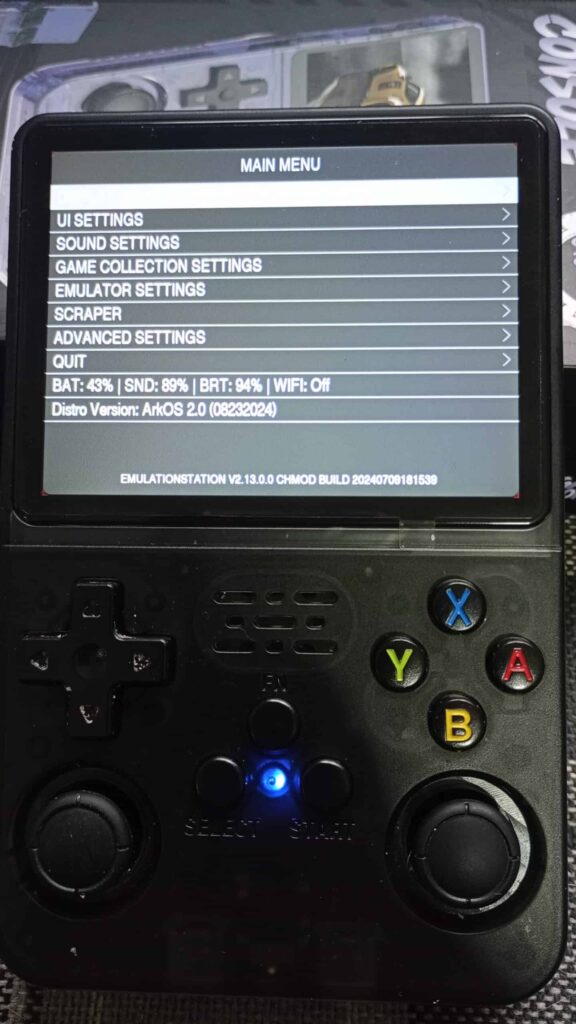
For $40, you’re getting a genuinely capable portable emulation console that handles the games that defined childhoods from the 80s and 90s. It’s not perfect, but it’s cheap enough that imperfection doesn’t sting. Whether you’re buying for a kid, yourself, or as a travel companion, the R36S delivers more fun per dollar than anything else in budget retro gaming.
The R36S is basically the ‘Honda Civic’ of handhelds. It’s not as pretty as the Miyoo Mini (the ‘iPhone’ of handhelds), but it’s cheaper, you can mod it yourself, and it’s easier to replace if you drop it on the sidewalk. If you want a status symbol, buy an Anbernic. If you just want to play Pokémon on the bus, buy this.
Grab one from a reputable AliExpress seller or Amazon if you want faster shipping. Spend an hour setting up ArkOS. Load your favorite games. Rediscover why you fell in love with gaming in the first place.
[UPDATE] 6 Months Later: How it’s Holding Up
I’ve been carrying this in my jeans pocket for half a year now. The shell has some micro-scratches, but the d-pad hasn’t lost its click. However, the screen protector that came with it started peeling at the corners after month three. If you’re buying this, just skip the included plastic film and buy a tempered glass one immediately, it feels 10x better under your thumbs.
